Posts

Laser Marking Zipper/Slider by CCD visual Position Laser Marking Machine

Laser marking Zipper/Slider by CCD Visual Position Laser Marking Machine

During the traditional laser marking process, the processed parts must be in a fixed position and not be shaken.

CCD visual position laser marking machine can automatically identify product features for laser marking to achieve rapid positioning, and even small objects can also be marked with high precision, without the need to use fixtures, reducing With manual participation, work efficiency is improved.

CCD Laser marking zipper/slider videos show

Relief Engraving on Lighter industry

How to install EZCAD software in new laptop?

How to install EZCAD software in New laptop?

Today we will share the steps of installing EZCAD software of laser marking machine.

5/5
First Step - EZCAD Software Install

1. Please copy the EZCAD software(software+driver file) from the USB flash or ask with supplier.

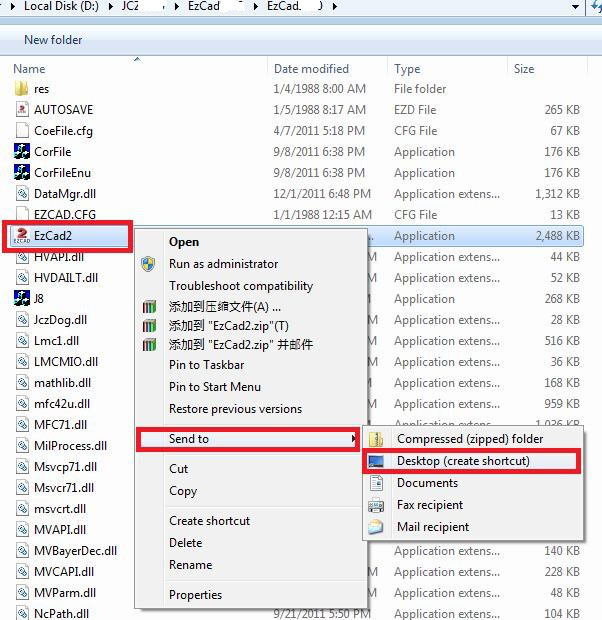
2.Send EzCad to desktop, as showninthe figure

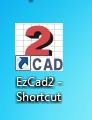
3.You will see the corn at the desktop of your computer.

5/5
Secon Step - Control Card Driver Installation

1.Power on the machine, keep the control card be in “ReadyMode”.

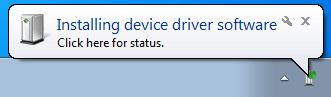
2Connectthe computer with USB cable, then the computer will show “ ”. Usually, you need to install the driver manually at the first time (The driver can not be installed well automatically).

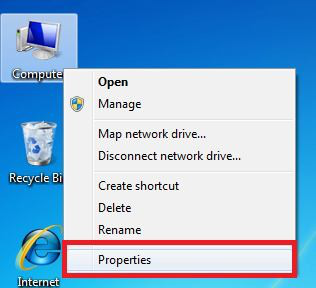
3.Find “My Computer”, choose “Properties” and “Device Manager”, as shown in the figure

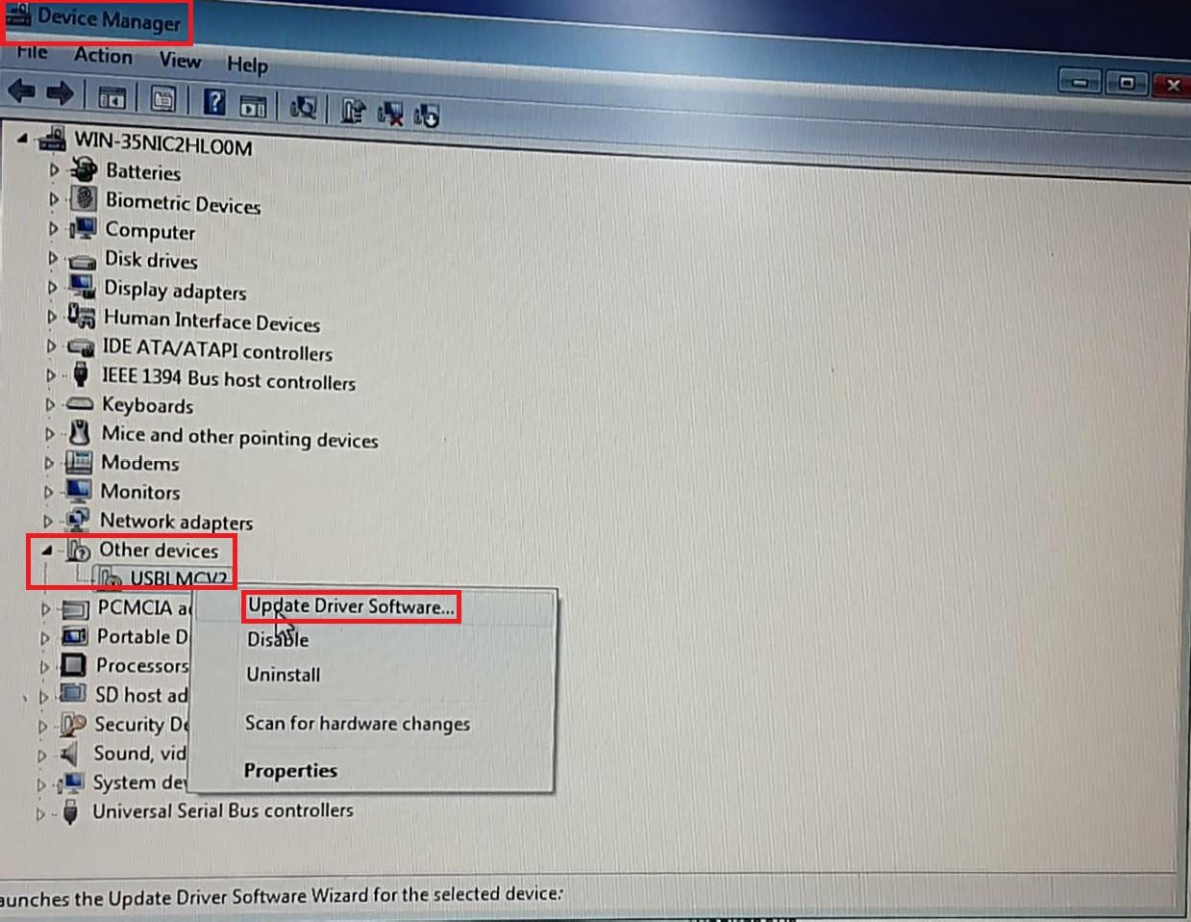
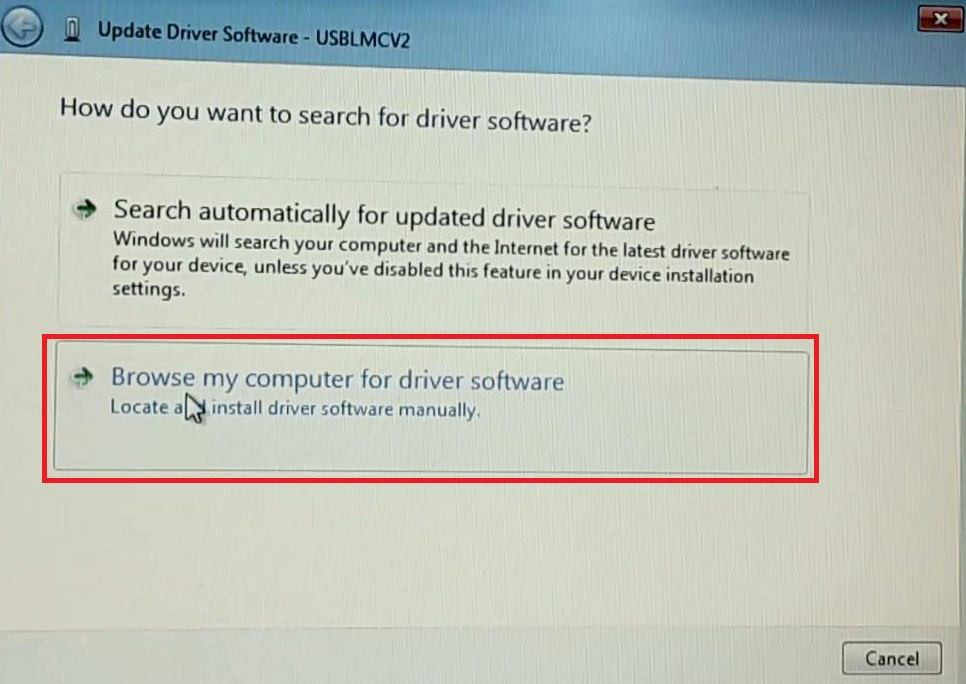
4.Choose “Other Devices” and you will see “USBLMCV2”, right-click to choose “Update Driver Software USBLMCV2”, as shown in the figure

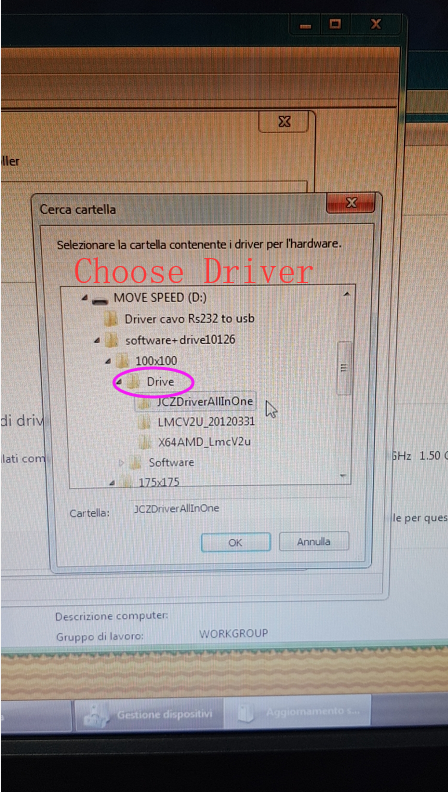
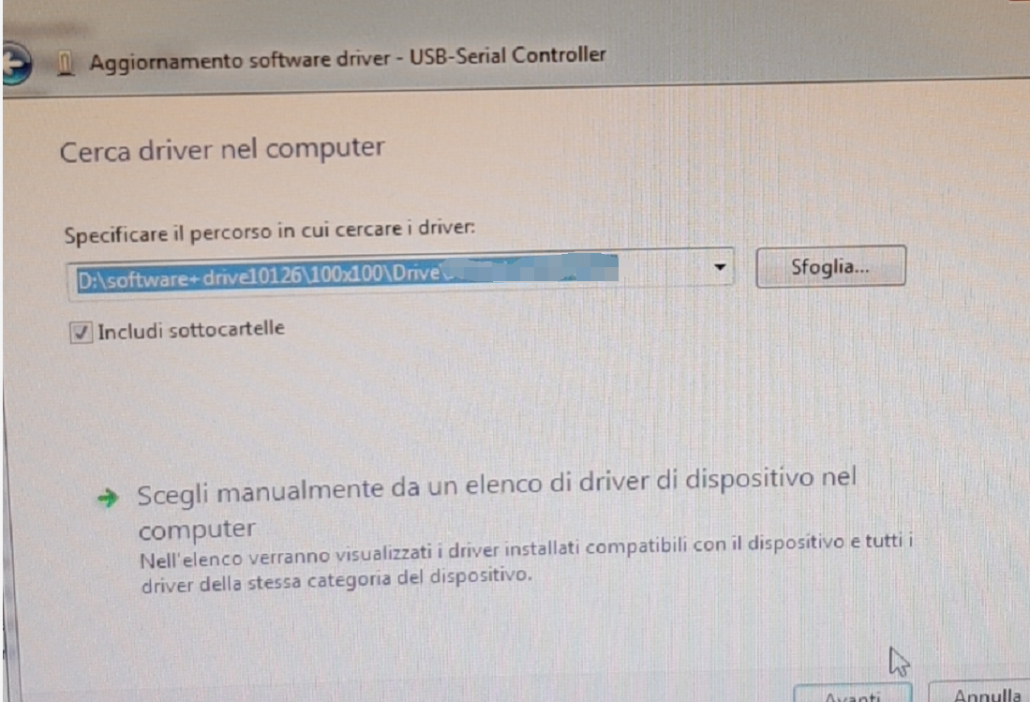
5.Choose the path of Driver, as shown in the figure

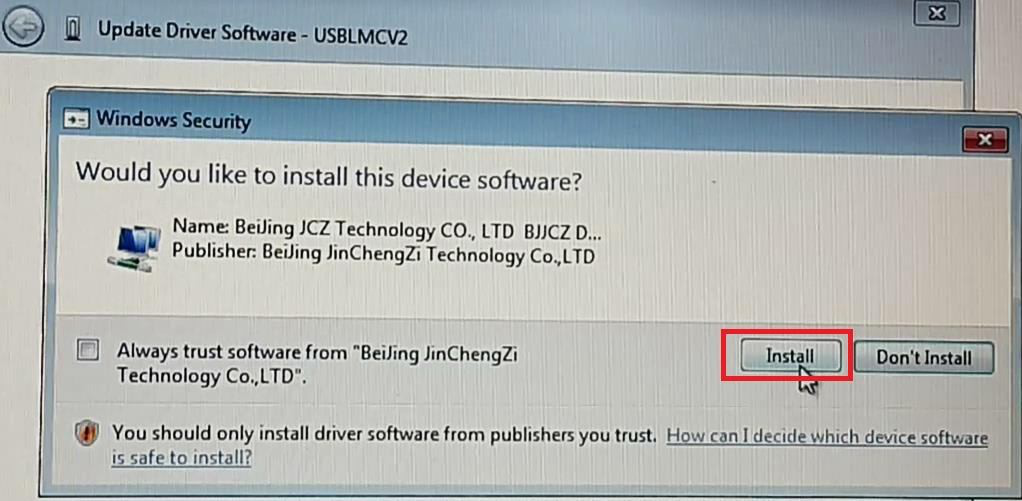
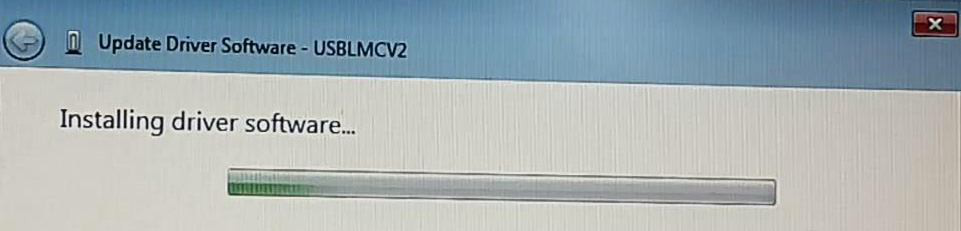
install Driver

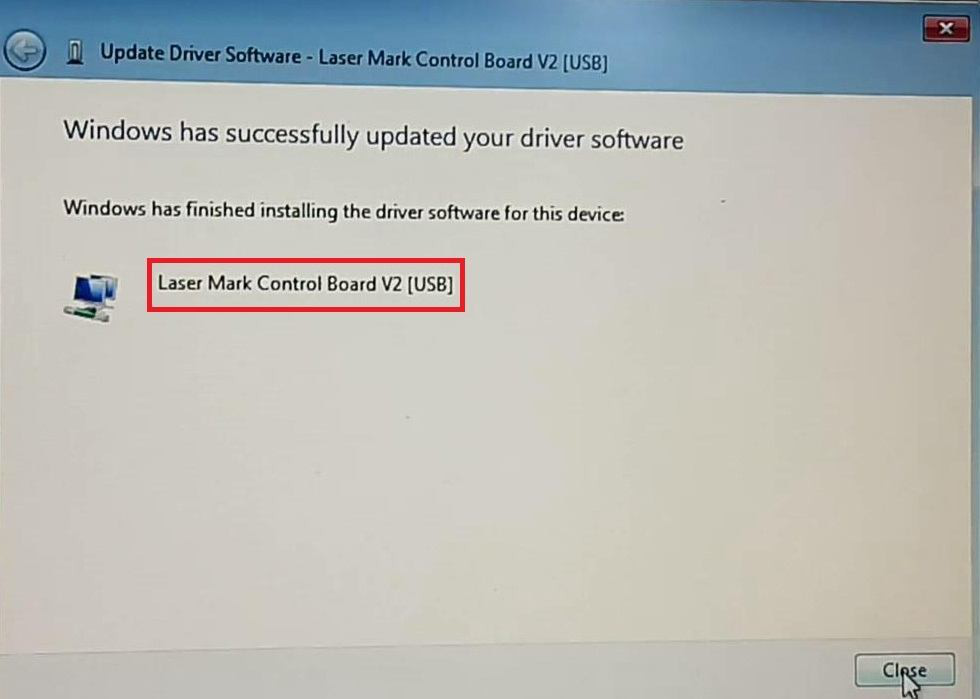
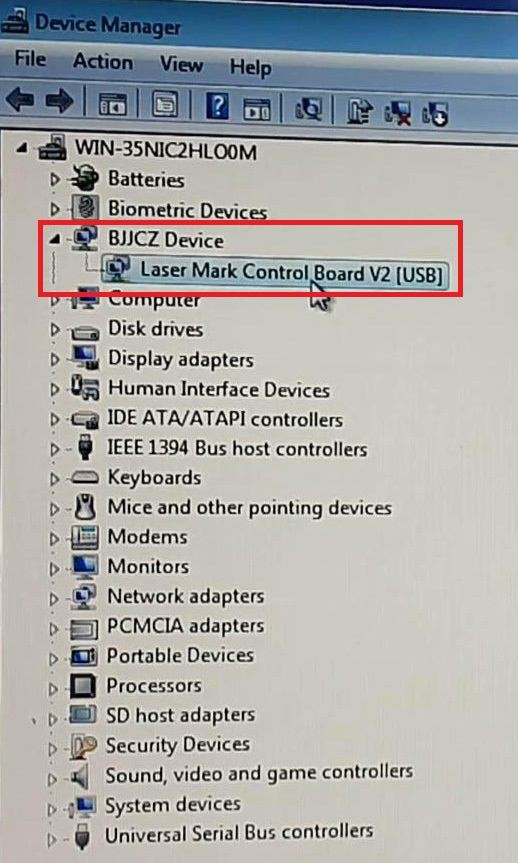
6.After finishing the driver installation, you will see “Laser Mark Control Board V2 [USB]” on “Device Manager”, as shown in the figure

Now, the Control Card Driver is installed well,the EZCAD software can be used well.

Whatsapp

86 13854105019

WeChat

86 138e54105019

Skype

ChinaLindaHao

Email

sales@sismarlaser.com

#EZCAD #LaserMarkingMachine #LaserEngravingMachine #FiberLaserMarkingMachine #LaserEngraver #LaserCutter #Laser #HowtoInstallEZCADSOftware

3 Quick solutions to check Red dot is running, but no marking?

"Red dot is running, but no marking"-Fiber Laser Marking Machine

During using fiber laser marking machine,we may encounder following problem-Fiber laser marking machine Red dot is running,but no marking.

Here are we list three steps,help you find the solution.

1.Operation problem:

First, check if the material can absorb the 1064nm laser wavelength.

Second, pls kindly check fiber laser marking machine,if on the correct focus distance marking? What’s the output laser power? If it is bigger lens? Usually the laser will be weaker for bigger lens, also the depth of focus is relatively shallow, prone to this situation.

Third, check the marking content, if it is JPG or BMP format picture.

How to check on this situation?

Use a piece of stainless steel, type TEXT, HATCH line distance is 0.05, laser power is 80%, speed is 500, chose Continue, then marking, up and down marking head, then we will find where the problem from.

2.Parameter setting problem:

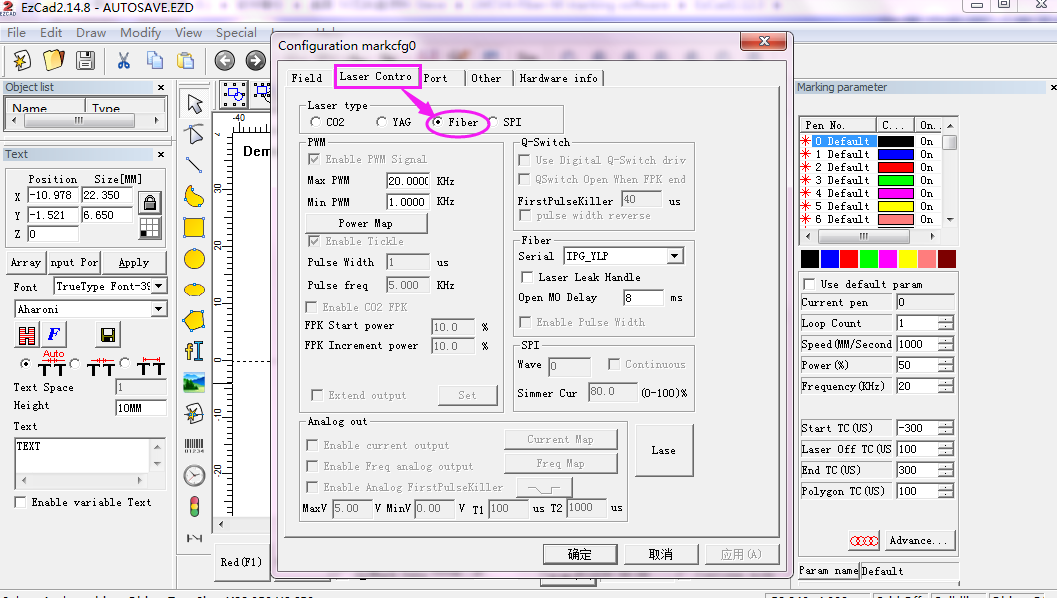
Check the laser control model.

It is in Fiber Laser model or not,if not,change into Fiber Laser model.

The laser control of fiber:

3.Laser source problem:

If above info are well, let us check fiber laser source or laser power supply.

Fist, cut off the whole machine for 5 minutes, then reboot.if still can not mark, then need to check the laser source.

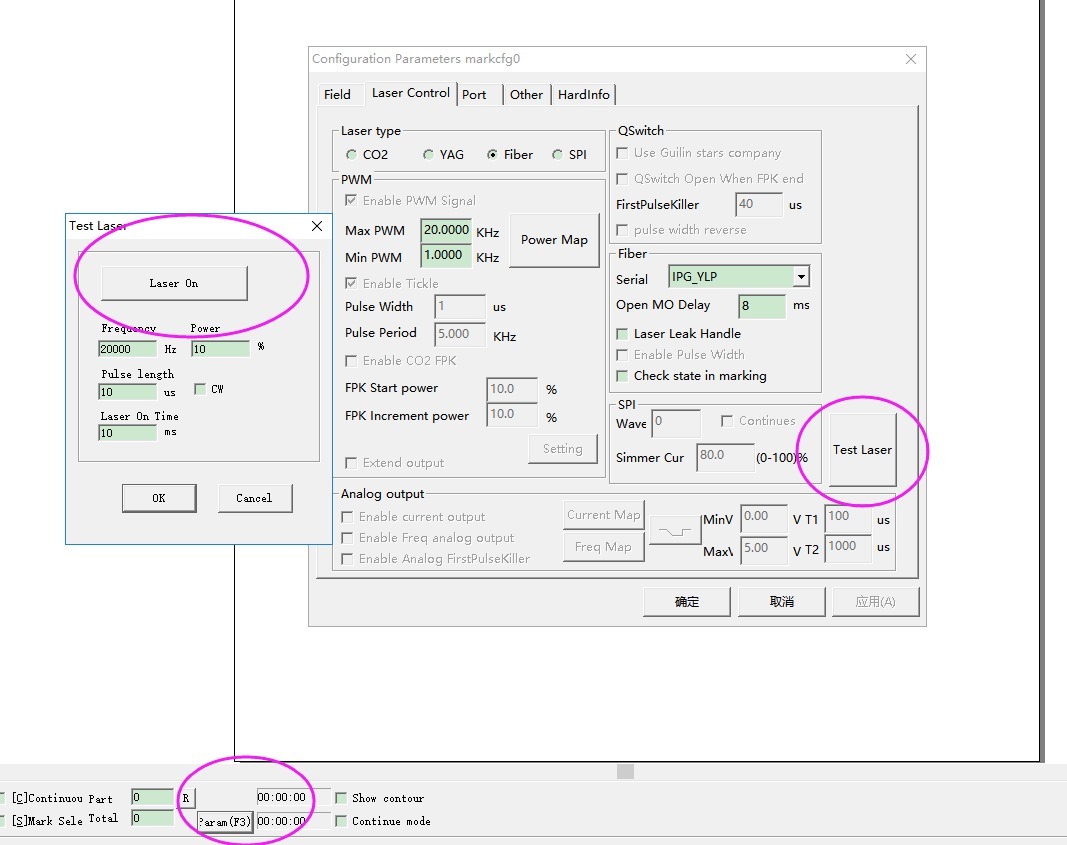
uninstall F-theta lens,adjust parameter as follows:

Put the white dimming piece below the marking head,pls kindly check if you can see the green laser spot on dimming piece. If can not, then laser source problem, further trouble shooting is required to resolve the problem either by laser failure or laser power failure

If you need more solution step,contact us by whatsapp/wechat:0086 13854105019 sales@sismarlaser.com

#LaserMarkingMachine #FiberLaserMarkingMachine #LaserEngravingMachine #LaserCuttingMachine #Co2LaserEngravingMachine #LaserMarker #FiberLaserMarker #Co2LaserCutter #Co2LaserEngraver #FiberLaserSource #LaserSource

Fiber Laser Cutting Machine for Jewelry

Jewelry Laser Engraving Cutting

You know many hand jewelry designer and manufacturer encounter the problem of working efficiency low,they are continually looking for reliable solutions for producing precision cutting of precious metals.

Mini and Mini cover laser-Laser marking, engraving & laser cutting machines from SISMAR laser, is the most suited tool for Jewelers and Goldsmiths as it allows them versatility, quality, precision that their customers need and deserve.

Applications of Mini Cover/Mini Fiber laser in Jewelry marking and designing

1.Laser jewellery etching, marking, surface engraving of jewelry,

2.Deep engraving to make dies for jewelry making,

3.Photo etching and picture marking on jewelry

4.Cutting of gold or silver to make jewelry pieces like earrings, rings, lockets, pendants etc.


What is max thickness can cut or deep engrave by Mini cover/Mini Fiber laser

1)The gold silver and brass material cutting range from 0.1 to 1.5mm;

the cutting time depend on cutting patterns and cutting size;

different cutting size spend different time.

Most our customers cut 0.5mm0.7mm 0.8mm and 1mm gold silver brass material for jewelry.The cutting size range from30mm to 100mm.

2)Aluminum ,stainless steel ,carbon steel for deep engrave from 0.5mm to 1.5mm by 50W fiber laser machine.

Deep engrave 0.5mm on 2mm aluminum by Fiber Laser machine

Two video tell you how fiber laser cutting name necklace;Engraving ring inside and outside

More info need,pls kindly contact us by email sales@sismarlaser.com Whatsapp/wechat:0086 13854105019

Hobby Series Co2 Laser Engraving Machine

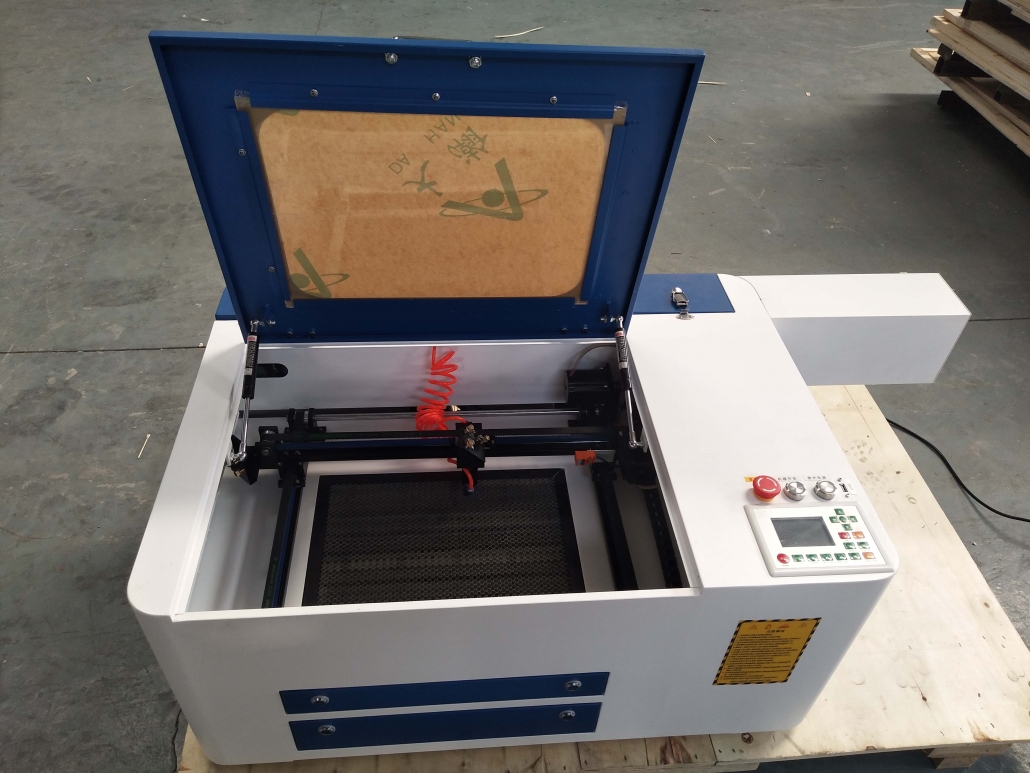
400*600mm Hobby Co2 Laser Engraving Cutting Machine

Unlock Your Creative Potential with Our Hobby Laser Engraving & Cutting Machine

Looking to bring your ideas to life? Our Hobby Laser Engraving & Cutting Machine is the perfect tool for DIY enthusiasts, makers, and small businesses. With precise engraving and cutting capabilities, you can work on a wide range of materials like wood, acrylic, leather, and more. Whether you’re creating custom gifts, personalized items, or prototype designs, this compact and easy-to-use machine is designed to help you turn your visions into reality.

Key Features:

  • Versatile Material Compatibility: Engrave and cut a variety of materials with ease.
  • Compact & Affordable: Perfect for home workshops or small spaces.
  • High Precision: Achieve intricate, detailed designs with incredible accuracy.
  • User-Friendly: Simple controls and intuitive software make it beginner-friendly.

Transform your creative ideas into reality today with our hobby laser engraving and cutting machine!

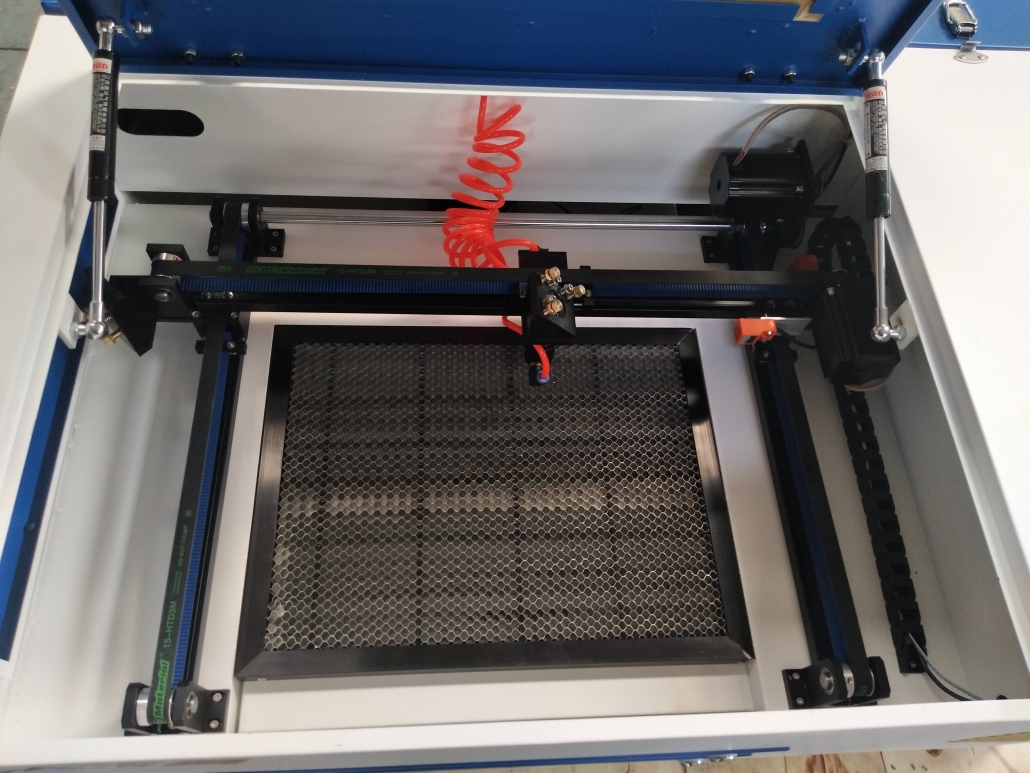
Photos of Hobby 400*600mm Co2 laser engraving cutting machine

Unlock Your Creativity with Our CO2 Laser Engraving & Cutting Machine

Are you ready to take your DIY projects to the next level? The CO2 Laser Engraving & Cutting Machine is exactly what you need. Whether you’re a hobbyist, small business owner, or creative enthusiast, this machine brings your ideas to life with precision and ease. From cutting intricate designs in wood and acrylic to engraving personalized messages on leather, this versatile tool is perfect for a wide range of materials.

1️⃣ Key Features of Our CO2 Laser Engraving & Cutting Machine

#Key FeaturesDescription
1High PrecisionAchieve stunning, intricate designs with accuracy that only a CO2 laser engraver can deliver. Perfect for detailed work on materials like wood, plastic, leather, and more.
2Wide Material CompatibilityFrom wood to acrylic, glass, and leather, our CO2 laser cutting machine can handle various materials, making it a must-have for crafting, small business production, and more.
3Efficient & Cost-EffectiveSave time and money with a machine that consumes less energy while offering quick engraving and cutting speeds, allowing you to maximize productivity and reduce costs.
4User-Friendly InterfaceDon’t worry if you’re new to laser engraving. This CO2 laser engraver comes with an intuitive control panel and easy-to-use software that makes getting started a breeze.
5Durable & Long-LastingBuilt to handle consistent use, our CO2 laser engraving machine ensures reliable performance and minimal downtime, allowing you to focus on what matters most—your creations.

2️⃣ Why Choose a CO2 Laser Engraving & Cutting Machine?

Whether you’re in crafting, small business manufacturing, or just love to personalize gifts, the CO2 laser engraving & cutting machine will transform your workflow. This machine offers precision cutting and engraving, allowing you to create complex designs with the utmost detail. It’s also versatile enough to work on various materials, making it perfect for a wide array of applications like sign making, jewelry engraving, customized gifts, and more.

Moreover, this machine is cost-efficient, running on low power while delivering fast results. If you’re looking for an affordable laser engraving and cutting solution that doesn’t compromise on quality, this is the machine for you.


3️⃣ Perfect for Small Businesses and DIY Enthusiasts

If you’re a small business owner, hobbyist, or DIY enthusiast, this CO2 laser cutting machine will save you time and money. Its compact design fits into small spaces, while its powerful laser ensures you get the job done quickly and effectively. Plus, the easy operation means you don’t have to be an expert to get stunning results.


4️⃣ Ready to Elevate Your Creative Projects?

Get started today with our CO2 laser engraving and cutting machine and unlock endless possibilities for custom designs, personalized gifts, and professional-quality products. Whether you’re cutting intricate patterns in wood or engraving your brand on glass, this machine is the perfect solution for turning your ideas into reality.

CategorySpecification
ENGRAVING AREA600mm * 400mm
MACHINE DIMENSIONS1300mm * 815mm * 420mm
WEIGHT100KG
LASERSpecification
Laser TypeSealed CO2 Laser Tube
Laser Power40W/60W
SYSTEMSpecification
Driving SystemStepper
Cooling ModeRecirculating Water-cooling and protection system
Operating Temperature0 – 45ºC
INCLUDES FREESpecification
ProcessorDSP+USB
SoftwareLaserwork
TableBlade Worktable
Water PumpBasic Water Pump
Exhaust FanBasic Exhaust Fan
WARRANTYSpecification
Parts/Labor1 year limited warranty (excludes shipping/consumable items)

Applications of the Hobby CO2 Laser Engraving & Cutting Machine

Unlock endless possibilities with the Hobby CO2 Laser Engraving & Cutting Machine—a tool that will revolutionize your creative projects. Whether you’re a DIY enthusiast, a small business owner, or a maker at heart, this machine allows you to bring your most ambitious ideas to life. Check out the specific advantages for each application below:


1️⃣ 🎁 Personalized Gifts That Wow

  • Engrave intricate designs on wood, glass, acrylic, or leather.
  • Create one-of-a-kind gifts that are sure to leave a lasting impression.
  • Customizable with names, dates, and personal messages.

2️⃣ 💍 Jewelry Design & Customization

  • Transform raw materials like wood, acrylic, and metal into breathtaking jewelry pieces.
  • Design intricate patterns and custom engravings for personalized jewelry.
  • Ideal for creating custom rings, necklaces, and bracelets with fine details.

3️⃣ 🪑 Woodworking & Crafting Masterpieces

  • Precise cuts for custom woodworking projects like signs, furniture, and decorations.
  • Engrave designs with high accuracy on wood, saving time and enhancing creativity.
  • Ideal for creating unique decor pieces or functional furniture parts.

4️⃣ 👛 Leather Engraving & Cutting for Unique Creations

  • Personalize leather goods like wallets, belts, and keychains with detailed engravings.
  • Create intricate leather patterns that make every piece stand out.
  • Perfect for crafting high-end, personalized leather products.

5️⃣ 🏗️ Model Making & Prototyping Precision

  • High accuracy for cutting and engraving materials for models, prototypes, and architectural designs.
  • Create scale models with perfect detail, ideal for design and architecture.
  • Precise results make prototyping ideas tangible and professional.

6️⃣ 🖼️ Sign Making for Stunning Branding

  • Custom signs and branding materials like logos, plaques, and business signs.
  • Laser precision ensures professional-level engravings that capture attention.
  • Enhance your brand identity with high-quality, unique signage.

7️⃣ 🎓 Educational & DIY Projects Made Easy

  • Bring DIY projects and school models to life with the power of laser engraving.
  • Create interactive displays, stencils, and learning tools for educational purposes.
  • Encourage creativity with hands-on, engaging educational projects.

8️⃣ 📦 Innovative Packaging Design

  • Custom engrave packaging materials like acrylic and cardboard for unique designs.
  • Perfect for personalizing product packaging, gift wrapping, and more.
  • Enhance brand image with creative logos and messages on packaging.

Why Choose the Hobby CO2 Laser Engraving & Cutting Machine?

This versatile machine is the perfect tool for any creative endeavor, providing unmatched precision, flexibility, and ease of use. Whether you’re enhancing your DIY projects, boosting your small business, or creating personalized gifts or custom designs, the Hobby CO2 Laser Engraving & Cutting Machine will take your creativity to new heights. Ready to make your ideas a reality? Get started today!

Hobby CO2 Laser Engraving & Cutting Machine – Frequently Asked Questions (FAQ)


1️⃣ What materials can I engrave and cut with the Hobby CO2 Laser Engraving & Cutting Machine?

The Hobby CO2 Laser Engraving & Cutting Machine can handle a wide variety of materials, including:

  • Wood (Plywood, MDF, etc.)
  • Acrylic
  • Leather
  • Plastic
  • Glass
  • Cardboard
  • Fabric
  • Rubber (for stamps)
  • Paper

This machine provides excellent results across multiple surfaces, making it perfect for custom gifts, business branding, and more.


2️⃣ How precise is the engraving and cutting?

The Hobby CO2 Laser Engraving & Cutting Machine offers high precision with fine detail, making it ideal for intricate designs. The laser engraving accuracy allows you to create detailed patterns on small to large-scale projects. Whether you’re engraving custom logos or cutting precise shapes, you can trust this machine to deliver consistent, professional-grade results.


3️⃣ Can beginners use this machine?

Yes! The Hobby CO2 Laser Engraving & Cutting Machine is designed with user-friendliness in mind. It comes with an intuitive control panel and easy-to-use software, making it accessible for both beginners and experienced users. Plus, it includes a comprehensive user manual and tutorials to help you get started quickly.


4️⃣ What is the maximum engraving and cutting area?

The machine offers an engraving area of 600mm x 400mm, which is perfect for most DIY projects and small business needs. Whether you’re working on signs, custom gifts, or model making, this large workspace ensures you can handle various project sizes without limitations.


5️⃣ Is the machine suitable for small businesses?

Absolutely! The Hobby CO2 Laser Engraving & Cutting Machine is a powerful tool for small businesses, offering high efficiency and cost-effectiveness. Its compact design fits into home workshops or small office spaces, while its high-quality results allow businesses to offer customized products with minimal overhead.


6️⃣ Does the machine require any special maintenance?

This machine is low-maintenance, but regular care is needed to ensure long-lasting performance. Key tasks include:

  • Cleaning the lens and mirrors to maintain optimal engraving quality.
  • Checking for any debris or residue on the work surface.
  • Water cooling system maintenance (if applicable).

The Hobby CO2 Laser Engraving & Cutting Machine is designed to run efficiently with minimal downtime, reducing the need for frequent repairs or costly maintenance.


7️⃣ How fast can the machine engrave or cut materials?

The engraving and cutting speeds depend on the material and the complexity of the design. Generally, the Hobby CO2 Laser Engraving & Cutting Machine is highly efficient, offering fast engraving and cutting without compromising on quality. You can expect quick turnarounds, especially for simple designs and small-scale projects.


8️⃣ What software is compatible with the Hobby CO2 Laser Engraving & Cutting Machine?

The machine is compatible with LaserWorks, which is included with the machine. It also supports popular design software like CorelDRAW, AutoCAD, and Adobe Illustrator. You can easily create designs and import them into the laser cutter for engraving or cutting.


9️⃣ What warranty is offered with the Hobby CO2 Laser Engraving & Cutting Machine?

The machine comes with a 1-year limited warranty, which covers any manufacturing defects. The warranty excludes shipping costs and consumable items like the laser tube. Be sure to follow the maintenance guidelines to extend the life of your machine and keep it running smoothly for years to come.


🔟 How do I get started with the Hobby CO2 Laser Engraving & Cutting Machine?

To get started, simply unbox your machine, install the software, and follow the step-by-step guide included. The easy-to-use interface and clear instructions will walk you through everything you need to know. Plus, there are plenty of tutorials available online to help you master the machine’s full capabilities.


Have more questions? Feel free to reach out to our customer support team for assistance!

More Videos of Laser engraving cutting

Request a Quote for a Co2 laser engraving cutting machine

SISMAR LASER has Co2 Laser engraving cutting Machine and other solutions for many industrial applications. Our solutions can serve as an upgrade to your existing CO2 laser engraving cutting system or an excellent choice for your first laser machine.

Request a quote for a high-quality CO2 laser engraving cutting machine that exceeds your expectations. You can also schedule a demo to see how CO2 laser engraving cutting machine works.

welcome to SISMAR laser. very glad to answer any questions about our fiber/Co2 laser marking/cutting machines.

Detached fiber laser marking machines

Detached fiber laser marking machine

1.Open table does not limit material size like small enclosed units
2.Permanently mark or etch smooth or uneven metals including firearms, tools, parts, jewelry, PVC & Acrylics
3.Up to 100x faster compared to gantry style lasers
4.Pre-installed w/ EZ CAD laser software compatible w/ most files and CAD software Air Cooled
5.Foot petal included for production job runs

. Key Information of Laser Marking Machine

Product Type

Laser Marking Machine


Marking Materials

Both metals and some non-metals

Metals: carbon steel/mild steel, stainless steel, aluminum, copper, magnesium, zinc; rare metal and alloy steel (gold,silvertitanium, etc.); special surface treatment (aluminum anodized, plating surface, surface oxygen breaking of aluminum and magnesium alloy)

Non-metals: plastics, rubber, resin, carton box, etc.


Applicable Industries

electronic components, IC, electrical appliances, mobile phones, plastic buttons, color paper, food packaging, clocks and watches, molds, gaskets and seals, bearing, auto parts,hardware, tools, building materials, PVC tubes, etc.

Marking Content

logo, character, serial number, bar code, data matrix


Main Parts

Fiber Laser Source, Scan Head, F-theta Lens, Marking Software, Computer


Core Parts & Brand & Lifetime

Core Parts: Fiber Laser Source

Brand: IPG, SPI, Raycus, Max, JPT (optional)

Lifetime: 100, 000 hours

Cooling Mode

Air Cooling

Continuous Working Hours

22 hours


Marking Software

English Version

Graphic Format Supported: DXF, PLT, AI, BMP, JPG, etc.

Easy Operation

With Powerful Function

Certification

CE, FDA

 Laser type

Fiber laser

Laser Power

20W/30W/50W/60W/70W/100W

Laser Source Brand

Raycus/JPT/IPG

Software

EZCAD(English/Korean/Spanish/Russia/Japanese version)

Marking area

100*100mm/200*200mm/300*300mm

Marking speed

7000mm/s

Working voltage

110/220V/50-60Hz

Cooling way

Air cooling

Warranty

3 Years (includes parts & laser power)

1).Long lifetime, over 100,000 hours.
2).Compact laser source with air cooling.
3).2 to 5 times more productive a traditional laser marker or laser engraver.
4).Super quality galvanometer scanning system.

5).High accuracy and repeatability for correct marks each time with galvanometer scanners and electronic controls.
6).More stable performance.
7).Professional control board and marking software. The software controlling system has the interface of windows and comprises files output by software such as Coreldraw, AutoCAD, Photoshop etc. It can support various file formats such as PLT,DXF,PCX,BMP etc.
8).Output power is stable, optical mode is good, beam quality is excellent.
9).Marking speed is fast, efficient, and high accuracy.
10).Appearance is professional, operation is easy.

Application Industry
Electrical — Engineering and Electrical part and component
Mobile — ( Cover, battery, keyboard , I Phone Case )
Jewelry — (Ring , pedeant , bracelet ) , eyeglass , clocks and craft
Building materials , PVC pipe, Car motor car spare part , Insturments and meters and cutting tool
Plastic — plastic case , aviation and aerospace,
Military product — hardware fitting and accessory , sanitary appliance
Food and beverage — Medicine package and medical instrument , solar PV industry

Available materails
–Many type of metals:
Gold,Silver,Stainless Steel,Copper,Aluminum,chrome Brass,etc
–Alloy and metal oxides:
Anodized Aluminum
–Some non-metallic materials & Special surface treatment:
silicon wafer,ceramics,plastic,rubber,epoxy resin,ABS,Printing ink,Plating,Spraying,Coating film

Tab Content

Fiber Laser marking machine with protective cover

Fiber Laser Marking Machine with Protective cover

1.Sealed table,working space is sealed,protect operator eyes safety,and when adding filter machine,it is more efficiency for gold and silver dust recovery,so the extraction will work better

2.Open table does not limit material size like small enclosed units

Protective Cover Desktop Fiber Laser Marking Machine with Unique Design Frame, Ergonomically designed with orange and white color machine,you can also choose other color, like blue and white.
machine with electric lifting pillar, which can instead of manual adjust laser path, High-definition computer

LASER TYPE

FIBER LASER

LASER WAVELENGTH

1064NM

OUTPUT

20W/30W/50W

FREQUECY RANGE

20KHZ~80KHZ

MAXIMUM SPEED

7000MM/S

RESOLUTION

0.001MM

PRECISION

0.01MM

MARKING AREA

100*100MM

POWER SUPPLY

0.5KW/ AC220V/ 50HZ~60HZ (OPTIONAL 110V)

ENVIRONMENTAL REQUIREMENT

0~35°C,90% OR HUMIDITY

EQUIPMENT SIZE

100CM*90CM*140CM

NET WEIGHT

95KG

COOLING SYSTEM

AIR CHILLER

Advantage of fiber laser marking machine with protective cover?

1.This type of laser marker also named enclosed fiber laser marking machine, u can see from the above picture of laser marker, the machine with full over to protect the healthy of worker,

2. This fiber laser marking system use USB interface connection,easy operation

3. High Precision, bring you the fantastic and satisfied marking effect.

4. Superior Laser Beam: the definition is 1 micron, 10 times as that of traditional products.

5.  No Consumables: One Fiber marker can work for more than 10 years without any consumables.

6. Fast Speed: 800 standard characters per second, is 3 to 5 times above that of traditional products.

7. The fiber laser beam comes out from the IPG / Raycus / Max fiber device directly

What’s the applicable Industries of fiber laser machine?

Mobile phone keypad, plastic translucent keys, electronic components, integrated circuits (IC), electrical appliances, communication products, sanitary ware, tools, accessories, knives, eyeglasses and clocks, jewelry, auto parts, luggage buckle, cooking utensils, stainless steel products and other industries. 

What’s the applicable Materials of fiber laser marking machine with protective cover
Metals (including rare metals), engineering plastics, electroplating materials, coating materials, coating materials, plastics, rubber, epoxy resin, ceramic, plastic, ABS, PVC, PES, steel, titanium, copper and other materials. 

How-to: Laser Engraving Photo

Today we will tell you how we engrave photos on a laser machine.

When you make the drawing,please save the japge or BMP format.Then you handle the drawing in the photoshop.The step is below.

1.open the drawing,adjust the drawing size,the resolution set into 800-1000,then ok.

2.reopen the drawing,choose the mode,grayscale,then ok

3.open the image-mode-Bitmap-choose the Halftone screen,the frequency is 50-70,the angel is 45,the shape (for the acrylic,it should be round;for the stone,it should be line)

4.Then you input the machine software to let machine work.

And you engrave the materials,the laser power should be less than 30%,we suggest you choose 12-17%.Please not worry,this time it will not happen the missing bits.

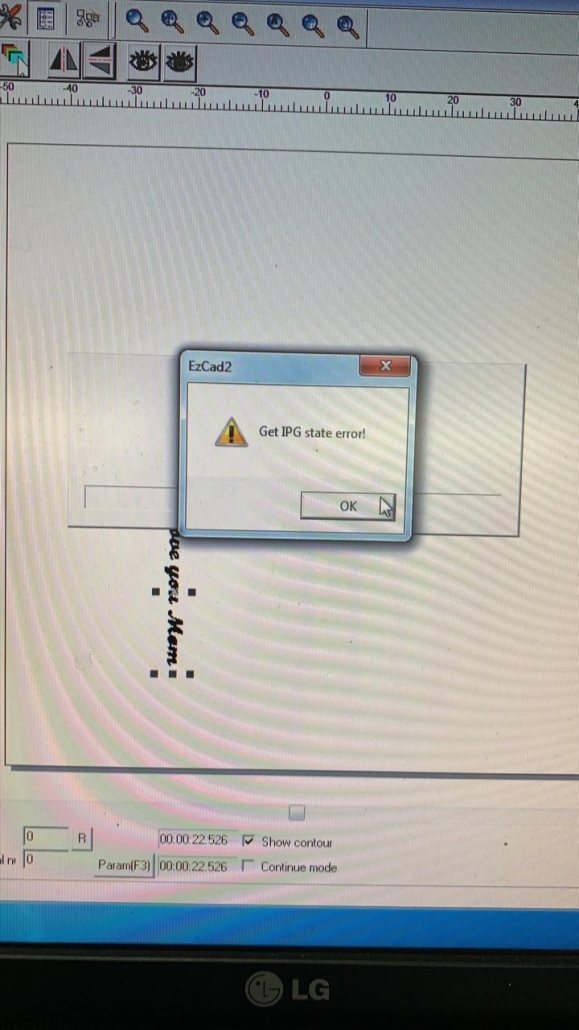
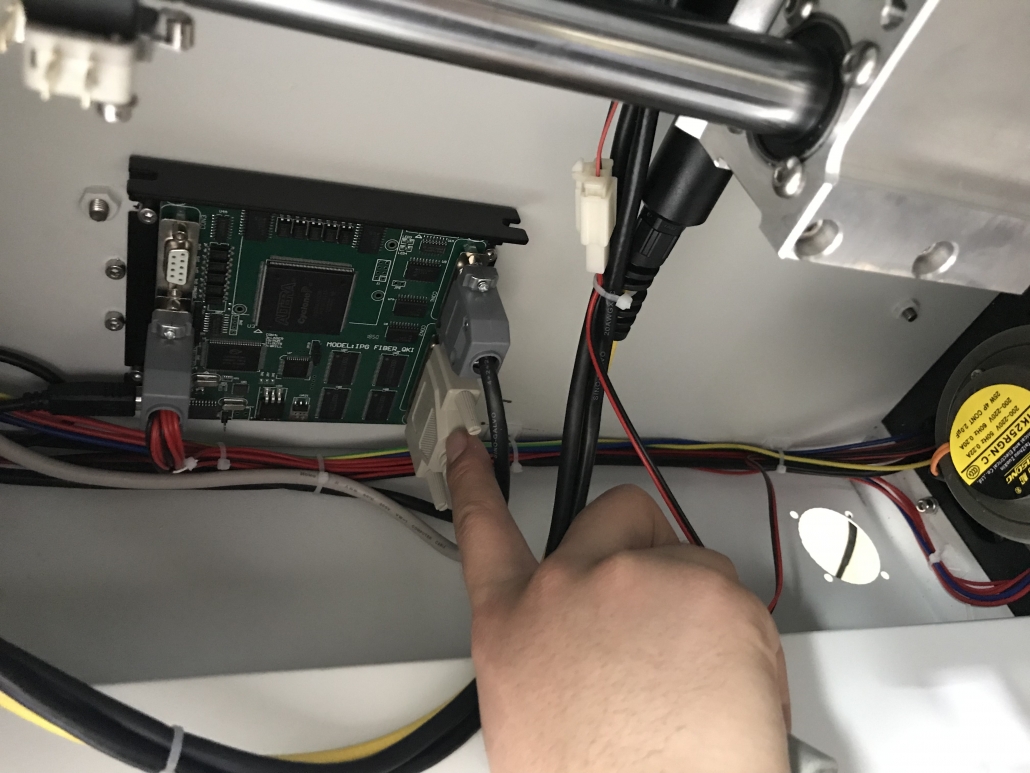
Get IPG state error of fiber laser marking machine

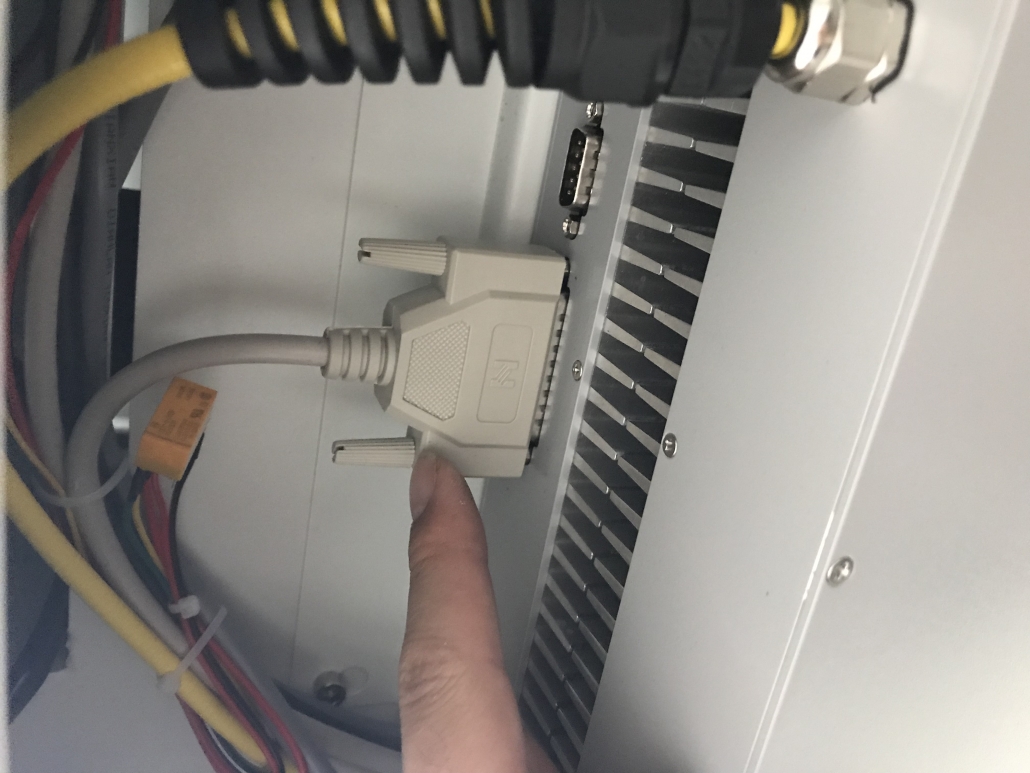
When laser marking machine at work,the EZCAD software show “Get IPG state error”

Pls kindly first power off whole machine,and re-plug the laser source cable two parts

More info,contact SISMAR LASER

Email:sales@sismarlaser.com

Whatsapp/Wechat:0086 13854105019